From PDF to Podcast: A Complete Guide to Listening to Documents
Learn how to convert any PDF into a podcast-style audio episode. A complete guide covering research papers, textbooks, reports, and more.
Stop reading PDFs. Start listening to them.
We all have a PDF graveyard. Research papers saved months ago. Industry reports downloaded with good intentions. Textbook chapters exported for “later.” The reading backlog grows because sitting down to read requires uninterrupted focus — and uninterrupted focus is the scarcest resource of modern life.
PDF to podcast conversion solves the bottleneck. You can listen to a 30-page report while commuting, absorb a research paper during a run, or review a textbook chapter while cooking. This guide covers everything you need to know about turning PDFs into audio. If you want the no-cost path to a first PDF-to-podcast episode, jump straight to How to make a podcast from a PDF for free; if your reading list spans more than just PDFs (DOCX, TXT, web articles, YouTube), see Podcast from documents.
What happens when a PDF becomes a podcast?
A good PDF-to-podcast tool does not simply read the document aloud word by word. That would be text-to-speech — flat, robotic, and difficult to follow for anything longer than a paragraph. (The accessibility argument for offering audio alternatives to long-form text is documented in W3C WCAG 2.2 — Audio Alternatives; the cognitive case is outlined in our piece on audio learning science.)
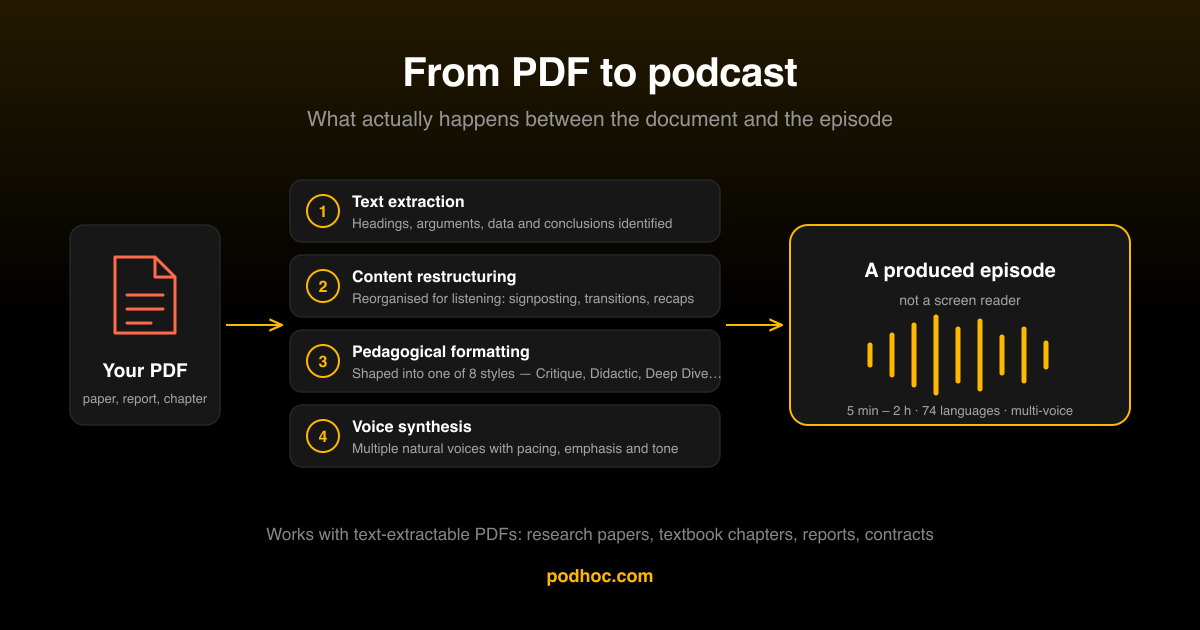
Instead, the process involves:
- Text extraction — The AI reads the PDF and identifies the key content, headings, arguments, data, and conclusions
- Content restructuring — The material is reorganized for audio comprehension, which has different requirements than written comprehension (shorter sentences, explicit transitions, recap points)
- Pedagogical formatting — Depending on the chosen style, the content is shaped into a conversation, lecture, debate, or explanation using proven teaching techniques
- Voice synthesis — Multiple AI voices deliver the content naturally, with appropriate pacing, emphasis, and tone
- Quality output — The result is a podcast-style episode that sounds produced, not generated
The difference between text-to-speech and AI podcast generation is the difference between a screen reader and a well-produced educational show.
Podhoc vs. basic TTS tools
It is worth being explicit about what separates Podhoc from a free text-to-speech utility, because the search results often blur the line. Both will produce audio from a PDF; only one produces a learning-grade podcast.
| Aspect | Basic TTS utility | Podhoc PDF-to-podcast |
|---|---|---|
| Voices | One synthetic voice | Multiple AI voices, two-host conversational pairings |
| Content selection | Reads the PDF verbatim, page numbers and all | Extracts key arguments, data and conclusions; skips noise |
| Restructuring | None — written prose, simply spoken | Reorganised for ear-friendly comprehension (signposting, recap) |
| Pedagogical shape | None | 8 formats: Critique, Didactic, Deep Dive, Feynman, Debate, more |
| Multi-source | One PDF at a time | Combine PDFs with notes, articles, YouTube — synthesised in one feed |
| Output | Flat read-aloud, fatigues quickly | Produced episode that sounds like a real podcast |
For a free first episode without leaving Podhoc, see How to make a podcast from a PDF for free — the free tier includes all 8 pedagogical formats.
Which PDFs work best?
Almost any PDF with readable text content can be converted. Some types work exceptionally well:
Research papers — Academic papers are ideal because they have clear structure (abstract, methodology, results, discussion) that translates well to audio explanation. A 20-page paper becomes a focused 15-30 minute episode. See our academic-papers landing page for a workflow tuned to this case.
Textbook chapters — Dense educational content benefits enormously from audio restructuring. Concepts that are hard to parse in written form often become clear when explained conversationally. See textbook chapters for examples and tips.
Industry reports — Business reports, market analyses, and whitepapers are typically written in dense corporate prose. Audio reformatting strips the padding and surfaces the insights.
Technical documentation — API docs, specifications, and guides become more accessible when explained step by step in audio format.
Legal and compliance documents — Policies, terms, and regulatory documents are notoriously difficult to read. Audio restructuring helps identify the key obligations and implications. See contracts and legal documents for the standard workflow.
Choosing the right audio style
Different documents call for different treatments:
| Document type | Recommended style | Why it works |
|---|---|---|
| Research paper | Critique | Evaluates the methodology and conclusions critically |
| Textbook chapter | Didactic | Structured teaching approach with clear explanations |
| Complex theory | Feynman Technique | Breaks concepts into simple first-principles reasoning |
| Controversial topic | Debate | Multiple voices argue different interpretations |
| General overview | Deep Dive | Comprehensive exploration of all major points |
| Quick summary | Simplified Explanation | Key takeaways in minimal time |
If the document is long and complex, consider generating two podcasts: a short Simplified Explanation for initial orientation, then a full Deep Dive for comprehensive understanding.
Duration strategy
The duration you choose affects how the AI treats the material:
- 5 minutes — Executive summary. Key conclusions and takeaways only
- 10-15 minutes — Main arguments with supporting evidence. Good for papers and short reports
- 20-30 minutes — Comprehensive coverage. Suitable for most documents up to 30 pages
- 45-60 minutes — Deep exploration with extended discussion, examples, and analysis. For long or dense documents
- Up to 2 hours — When you need every detail covered. Best for textbooks or multi-section reports
Match the duration to when you will actually listen. A 45-minute podcast is perfect for a gym session but frustrating if you only have a 10-minute walk.
Combining PDFs with other sources
Single-source podcasts work well, but combining multiple sources produces richer, more nuanced audio:
- Paper + lecture — Upload the PDF and add the YouTube link of the professor’s lecture on the same topic. The podcast synthesizes both
- Report + article — Combine an industry report with a news article for context
- Multiple papers — Upload several related papers for a synthesized literature review
- PDF + your notes — Add your own annotations and highlights as a text file alongside the original document
Per-source weighting lets you control the emphasis. If the PDF is the primary source and the article is background, weight accordingly.
Tips for best results
- Check text quality — Podhoc reads PDFs with extractable text. If your only copy is a scan or photo, run it through any OCR tool (operating system, document app or third-party utility) to produce a text-extractable PDF before uploading
- Remove irrelevant pages — Table of contents, indexes, and reference lists add noise. If possible, extract just the chapters you need
- Start short — Generate a 10-minute Simplified Explanation first to check that the extraction captured the right content, then generate a longer version
- Try different styles — The same PDF can produce very different podcasts depending on the style. A Critique of a research paper and a Didactic version serve different purposes
- Use the right language — The source PDF and output language can be different. Read a French paper, listen in English. Or vice versa, for language practice
Start listening
Upload a PDF right now — that paper you have been putting off, that report from last week, that chapter you highlighted but never revisited. In minutes, it becomes a podcast episode you can listen to during your next commute or workout.
Related reading
- Listen to PDFs — hub page — the central hub for PDF-to-audio across document types.
- Why audio learning works — the cognitive science behind listening.
- How to turn study notes into a podcast — the companion playbook for personal notes.
- Best NotebookLM alternative — comparison if you have outgrown NotebookLM’s PDF flow.
- The Critique audio style — recommended for research papers.
- Podhoc REST API — bulk-process PDFs from Zotero, Mendeley or an institutional repository.
- The Best App to Learn from PDFs: A 2026 Comparison — side-by-side comparison against NotebookLM, Speechify and ElevenLabs.
Note: Google renamed NotebookLM to Gemini Notebook on 16 July 2026. It is a rename and relaunch, not a new product — existing notebooks, links and
notebooklm.google.comkeep working — so any comparison to “NotebookLM” on this page applies equally to Gemini Notebook. We keep the NotebookLM name here because it remains the more common search term.