What Is an AI Podcast? Definition, How It Works, and How to Make One
An AI podcast is a podcast-style audio episode generated by artificial intelligence from text — papers, articles, notes, PDFs.
What is an AI podcast?
An AI podcast is an audio episode whose script and speech are generated from source material. It may summarize or reorganize the source. The number of voices, output language and available formats depend on the tool and plan; the audio still needs checking.
Prepare and review a text source
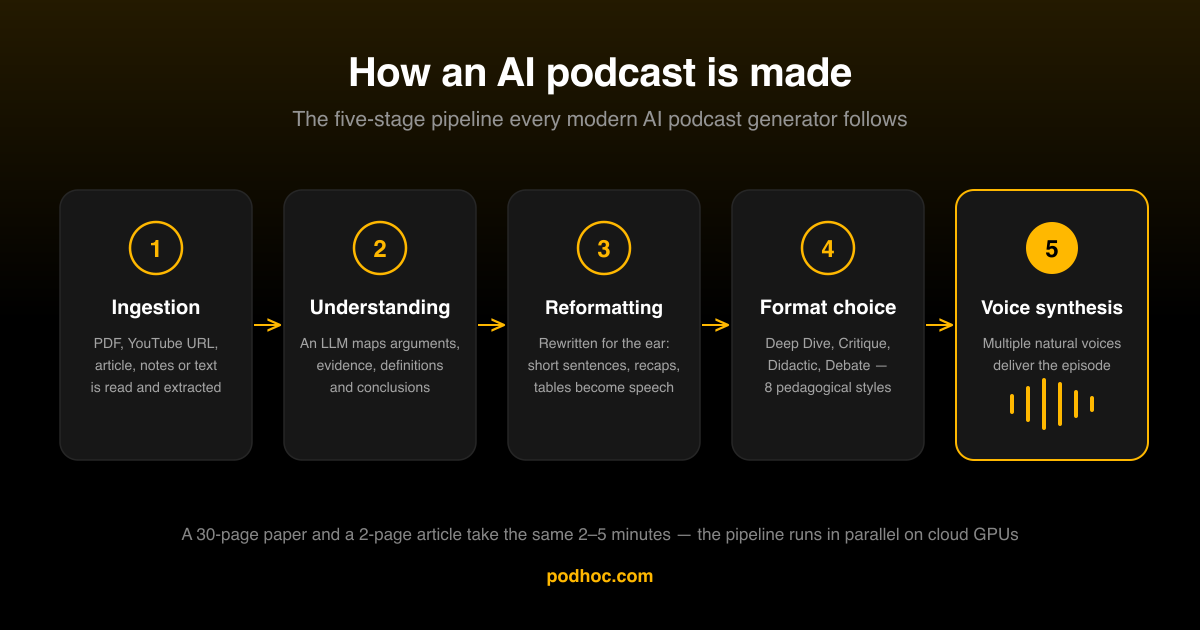
How source material becomes an AI podcast
Text-to-speech normally voices a supplied text, while a generated podcast first rewrites or summarizes it and then synthesizes speech. Reader features and voice quality vary. Choose a reader for faithful wording; choose a generated explanation when restructuring is useful and you can review the result. Neither format guarantees better learning.
Target duration is approximate. Processing time varies with the source, requested length, queue and services; this guide does not promise a fixed completion time.
The web app supports pasted text and supported URLs on Free; PDF, DOC, DOCX and TXT file uploads require Creator or Pro. Text extraction, source accessibility and plan limits still apply. Scanned images require separately checked OCR. Markdown/EPUB file upload support is not promised by this guide.
What an AI podcast is not
Image-only scans are not supported as text PDFs. If you use a separate OCR tool, review its extracted text before processing; OCR can misread numbers and symbols. Password protection, login-only links, extraction errors and plan size limits can prevent processing. EPUB files are not a supported direct-upload format. Choose a dedicated reader if you need an exact read-aloud of every sentence.
What makes Podhoc’s AI podcast generator different
Free uses one pasted-text or supported-URL source, English or Spanish output, one voice and five styles. Creator adds file uploads, two sources, two voices and all 73 output languages; Pro allows up to 50 sources and three voices. Both paid plans include all nine styles. Buying credits adds balance; it does not unlock paid features.
Who uses AI podcasts, and for what
Choose one topic from your syllabus and turn your own notes into a listening aid. A short podcast can give you another way to revisit the material; it does not replace reading, worked problems, teacher feedback or exam practice.
For lecture notes, keep definitions and questions together; use the student guide for a review routine. For meeting notes, explicitly label decisions, proposed actions and open questions. A faithful read-aloud tool may suit you better when every original word matters: Podhoc produces a new explanation, not a verbatim recording.
Duration and trial budget
The 50 welcome credits are a one-time grant. Generation starts at 36 credits, so a short trial can fit the grant, but it does not fund unlimited episodes. Review the quote before generating; longer episodes and additional features can cost more. Target duration is approximate, and processing time varies with the source, requested length, queue and services.
Choosing a format
Free styles are Deep Dive, Feynman Technique, Simplified Explanation, Pedagogical Framework and Alchemist’s Formula. Creator and Pro also include Critique, Didactic, Debate and References Recall. A style changes the presentation; it is not proof of better learning.
How AI podcasts fit into a learning workflow
Listening can make course material available in a different format. That convenience does not demonstrate better comprehension, stronger retention or a benefit for every learner. A generated summary also changes the source: omissions and errors need checking before it becomes a study aid.
- Choose a small source section and write a few questions before listening.
- Keep the original text available. Compare the explanation with its evidence and limitations.
- Pause and answer from memory, then check your answers. Replaying an episode is exposure; trying to retrieve an answer is a different activity.
- Schedule another review according to your errors and the course requirements. Check progress with similar questions, not just completed listening minutes.
How to make your first AI podcast
- Group notes under topic headings. Expand unfamiliar abbreviations, distinguish facts from questions and remove details you should not publish.
- Paste one set of notes on Free. Creator or Pro is required for file uploads or combining sources; Pro supports up to 50.
- Choose an available style, output language and target duration. Free has one voice and English/Spanish output. Check the quote before generating.
- Compare the resulting audio and transcript with the notes. Confirm decisions, dates, names and unresolved questions before downloading your own episode or sharing it.
Use only material you are allowed to process. Free podcasts are public in Discover. Creator and Pro can disable Auto-publish before generation or make an episode private later. Source files stay private, but generated audio, title, cover and summary may reveal their contents. Do not use confidential class, meeting or patient material without the appropriate permission.
Related reading
- Text to podcast — the complete guide — the practical workflow for converting any written source.
- NotebookLM alternative — how Podhoc compares on multi-source, multi-format and multi-language axes.
- Audio learning: evidence and limits
- From PDF to podcast — a complete guide — turn the PDF graveyard into commute audio.
- How to turn study notes into a podcast — a step-by-step recipe for students.
- 5 ways AI podcasts fit into your daily routine — practical slots for listening.
- The 9 audio styles — pedagogical formats and when to use each.
- Podhoc REST API — integrate AI podcast generation programmatically.
- AI Podcast Generator vs. Articles Summarizer: Which Is Better for Consuming Content? — how the two tool categories differ and when to reach for each.
Frequently asked questions
- What is an AI podcast in one sentence?
- An AI podcast is an audio episode whose script and speech are generated from source material. It may summarize or reorganize the source. The number of voices, output language and available formats depend on the tool and plan; the audio still needs checking.
- How is an AI podcast different from text-to-speech?
- Text-to-speech normally voices a supplied text, while a generated podcast first rewrites or summarizes it and then synthesizes speech. Reader features and voice quality vary. Choose a reader for faithful wording; choose a generated explanation when restructuring is useful and you can review the result. Neither format guarantees better learning.
- How long does it take to create an AI podcast?
- Target duration is approximate. Processing time varies with the source, requested length, queue and services; this guide does not promise a fixed completion time.
- How long are AI podcast episodes?
- Choose a target duration before generation. The finished episode can be shorter or longer than that target. Review the quote before starting; longer outputs and additional features can cost more.
- What sources can be turned into an AI podcast?
- The web app supports pasted text and supported URLs on Free; PDF, DOC, DOCX and TXT file uploads require Creator or Pro. Text extraction, source accessibility and plan limits still apply. Scanned images require separately checked OCR. Markdown/EPUB file upload support is not promised by this guide.
- Are AI podcasts good for studying?
- Listening can make course material available in a different format. That convenience does not demonstrate better comprehension, stronger retention or a benefit for every learner. A generated summary also changes the source: omissions and errors need checking before it becomes a study aid. People differ in hearing, attention, language and access needs. Retain accessible text and transcripts; generated audio is not a substitute for an accommodation or professional assessment. This page provides no product trial establishing improved grades, ADHD outcomes or superiority to a text-to-speech reader.
- Can I use AI podcasts in any language?
- Free uses one pasted-text or supported-URL source, English or Spanish output, one voice and five styles. Creator adds file uploads, two sources, two voices and all 73 output languages; Pro allows up to 50 sources and three voices. Both paid plans include all nine styles. Buying credits adds balance; it does not unlock paid features. Podhoc can use source material in one language to generate an explanation in another supported output language. This is a new summary and explanation, not a certified or word-for-word translation. Meaning, emphasis, terminology and pronunciation can change.
- What permission and privacy checks should I make?
- Use only material you are allowed to process. Free podcasts are public in Discover. Creator and Pro can disable Auto-publish before generation or make an episode private later. Source files stay private, but generated audio, title, cover and summary may reveal their contents. Do not use confidential class, meeting or patient material without the appropriate permission.